


Photo Collage Maker - FunPic
4.43.51K Reviews
App Specs
- Version
- 2.7.0
- Updated On
- License
- Free
- Downloads
- 10,000,000+
- Developer
- Photo Collage & Grid - Foto Grid
- Categories
- Photography
- Platform
- Android, iOS
Screenshots
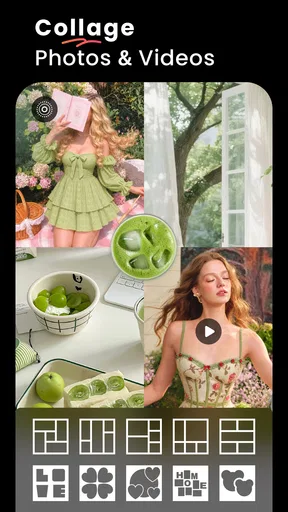






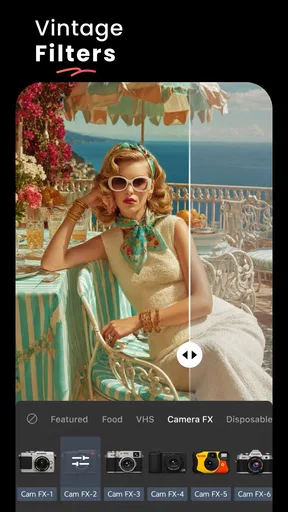
 Analysis by AppCompare
I tend to reach for a collage maker when a set of photos tells one story better than any single image can. Photo Collage Maker - FunPic is built around that quick, visual task: arranging pictures into a shareable composition, with a background eraser among the tools that help separate a subject from its original setting. That combination makes it more than a simple grid builder, though it is still best thought of as a casual creative app rather than a full photo-editing workstation.
Why the background eraser changes the result
Removing a background can make a collage feel deliberately designed instead of looking like several pictures placed in boxes. A person, pet, or object cut away from a busy scene can sit against a cleaner color or pattern, helping the main subject stand out. It is especially useful when the original backgrounds vary widely and would otherwise make a group of images feel visually messy.
I would use this selectively. A clean cutout can add focus, but removing every background may make a collage feel artificial or crowded. The best result is often one prominent cutout alongside ordinary photographs, so the eye has a clear place to land. Hair, fur, fine branches, and objects with similar colors to their surroundings are harder edges for this kind of edit; zooming in and checking the outline before saving is a worthwhile habit.
A simple workflow for a more considered collage
I would start by choosing the photos for one specific purpose rather than opening the whole camera roll and trying to fit everything. Pick a small group with a shared subject, then decide which image should lead. If one photo has a distracting background, try the eraser on that image first and compare it with the untouched version. That quick check helps avoid spending time on an edit that does not improve the overall composition.
After arranging the pictures, look at the spaces between them and the balance of color. A bright cutout against a patterned background can compete with stickers or text, so I would keep extra decoration restrained. If the collage is meant to be seen on a phone, inspect it at the size it will appear in a feed or message: details that look clear while editing may become too small once the whole layout is visible.
Getting Started with FunPic
First things first, downloading and installing Photo Collage Maker - FunPic was a breeze. A quick search in the App Store or Google Play, and I was ready to roll. The app doesn't take up much space, so no worries about bogging down your device. Once installed, you're greeted with a vibrant and intuitive interface that just invites you to start creating.
Features That Stand Out
Now, let’s talk about the features. FunPic offers a plethora of templates, which is perfect if you’re like me and sometimes need a little inspiration to get started. You can choose from a variety of layouts, whether you want a classic grid, a funky mosaic, or something more avant-garde.
Worth Reading Before You Choose

EA SPORTS FC Mobile 26 Is a Bigger Football Game, but It Takes Time

Flipboard Shows What News Apps Must Do Beyond the Feed

Switching to Android Auto Means Rethinking Your Driving Routine

Google Calendar Makes a Crowded Week Easier to Manage

Ludo King Makes the Most of the Minutes Between Plans

Baby Panda World Brings Quick Play to Modern Phones, but Its Game Library Feels Busy
- Templates Galore: Over 100 templates to choose from, so you never run out of ideas.
- Sticker Heaven: A massive library of stickers to add a personal touch. From cute emojis to quirky quotes, there's something for every mood.
- Backgrounds and Patterns: A wide range of backgrounds, patterns, and colors to make your collage stand out.
But wait, there's more! The app also features a robust editing suite. You can tweak brightness, contrast, and saturation, ensuring your photos look just right. Plus, the filters are top-notch—perfect for adding that extra oomph to your pictures.
User Experience
Using FunPic is a delightful experience. The app is smooth, and I didn't encounter any lag, even when working with high-resolution images. The drag-and-drop functionality feels natural, and the pinch-to-zoom feature is super handy for fine-tuning your creations. It’s like having a mini Photoshop in your pocket, but without all the complexity.
I also appreciate the app's sharing capabilities. Once your masterpiece is ready, you can easily share it on social media, or save it to your device. There's even an option to print your collages directly through the app, which is fantastic if you're looking to create physical keepsakes.
Why You Should Try FunPic
So, why should you give FunPic a shot? For starters, it's perfect for anyone who loves making their photos shine. Whether you're documenting a vacation, celebrating a special occasion, or just capturing everyday moments, FunPic makes it easy and fun to create stunning collages.
A practical example is a quick recap of a family afternoon: choose a few pictures of the same outing, make one the focal image, and use the rest to show small details such as a meal, a game, or a funny moment. A cutout can help a person stand apart from a cluttered background, but it need not be applied to every photo. Keeping the images and decorations limited makes the finished collage easier to read on a small screen.
That kind of focused workflow is where I see the strongest use for the app. It suits someone who wants a polished-enough result for a social post, a group message, or a personal memory without learning a layered editing program. It is less appealing if your priority is precise retouching, exact control over every edge, or a long, repeatable design process; a dedicated editor is the better fit for that work.
Where it fits among photo apps
Compared with the basic collage tools built into many photo apps, FunPic’s appeal is the creative combination of layouts and background removal. A basic grid is usually quicker when all you need is to place pictures side by side. FunPic makes more sense when you want to vary the composition or lift a subject out of its surroundings. By contrast, a full-featured editor is generally preferable for detailed masking, careful color matching, or exact placement. I would treat this app as a fast middle ground between a plain grid and a more demanding editing workflow.
One useful trade-off is to decide on the final destination before choosing a layout. A collage for a social feed benefits from a clear focal point and less tiny detail; a keepsake viewed on a larger screen can make room for more supporting pictures. If you are unsure, make a simple version first and only add a background treatment or sticker when it contributes something. That prevents decoration from taking attention away from the photos.
Moreover, the app is free, with optional in-app purchases for extra features, so you can try it out without any commitment. And trust me, once you start playing around with it, you'll be hooked. The creative possibilities are endless, and it's a fantastic way to unleash your inner artist.
Who is likely to enjoy it
FunPic is a reasonable choice for casual creators, families collecting moments from an event, and anyone who regularly turns several photos into one shareable image. Beginners can start with a layout rather than building a design from scratch, while more playful users can experiment with cutouts and backgrounds. Its Photography category, free entry point, and Everyone age rating make it approachable for a broad audience. The app is developed by Photo Collage & Grid - Foto Grid, and its version 2.5.0 requires Android 7.0 or later.
There is also a useful distinction between “easy to start” and “effortless to finish.” A template can get the pictures onto a canvas quickly, but the result still benefits from checking alignment, visual balance, and whether each chosen image earns its place. For a fast birthday recap, I would favor a few clear photographs and one restrained accent over filling every gap. The extra minute spent removing a distracting background or simplifying a busy arrangement can make the collage feel much more personal.
It is not the app I would choose for someone who wants to edit a single photograph in depth, produce tightly controlled print layouts, or maintain a precise brand style across many designs. Those jobs depend on finer controls and consistency than a quick collage workflow is meant to provide. Nor would I use a cutout just because the tool is available: if the background helps explain the scene, keeping the original photo intact may tell the story better.
What to expect before you settle on it
FunPic has an average rating of 4.4 from around 332,000 ratings, with about 3,400 written reviews and over 10 million installs. Those figures suggest it has found a large audience, but they cannot tell you whether its style suits your own taste; the best test is to make one small collage with photos you already know well. The app is free to download, while in-app purchases range from $9.99 to $25.99 per item, so I would explore the basic workflow first and consider any paid option only if it solves a need you actually have.
For a newcomer, the main question is whether the editing feels manageable. I would begin with a familiar set of pictures, choose a straightforward layout, and postpone stickers until the photos are balanced. If background removal is the reason you are trying it, use an image with a clear separation between subject and surroundings before tackling tricky edges. This makes it easier to judge the effect of the tool without mistaking a difficult source photo for a problem with the whole workflow.
Another sensible question is whether a collage will look good after sharing. Before exporting or posting, check that faces remain visible, the smallest pictures are still recognizable, and the cutout edges do not draw more attention than the subject. A composition that looks lively while zoomed in can become cramped when reduced to a phone-sized preview. I find that removing one decorative element is often a better fix than adding another.
Final Thoughts
In a world where everyone’s looking to add a personal touch to their photos, Photo Collage Maker - FunPic offers a comprehensive suite of tools to do just that. It’s user-friendly, packed with features, and most importantly, it makes the process of creating stunning collages incredibly fun. So, whether you’re a seasoned photo editor or a complete newbie, I highly recommend giving FunPic a go. You might just find your new favorite app.
My recommendation is measured: try it when your goal is to bring a handful of images together and give one subject a cleaner, more prominent place. It is approachable for quick personal projects, but not a replacement for a specialist editor when accuracy and repeatability matter. With a little restraint around cutouts and decoration, it can turn ordinary snapshots into a coherent visual story without making the process feel like a design assignment.
Pros
- User-friendly interface for easy navigation.
- Wide variety of templates and layouts.
- High-quality export options available.
- Supports multiple image formats seamlessly.
- Includes fun stickers and text options.
Cons
- Contains frequent ads interrupting use.
- Limited free features without subscription.
- Occasional app crashes on older devices.
- Large file size can slow down performance.
- No offline mode for editing without data.
FAQs for Photo Collage Maker - FunPic
What features does Photo Collage Maker - FunPic offer?
Photo Collage Maker - FunPic provides a wide range of features, including customizable templates, various grid layouts, stickers, and text options. Users can also apply filters and effects to enhance their images. The app supports high-resolution exports, ensuring your collages look sharp and professional on any device.
Is Photo Collage Maker - FunPic free to use?
Yes, Photo Collage Maker - FunPic is free to download and use. However, it offers in-app purchases and a premium version that unlocks additional features such as exclusive templates, ad-free experience, and more advanced editing tools. This allows users to choose the level of functionality they need.
Can I share my collages directly from the app?
Absolutely! Photo Collage Maker - FunPic allows you to share your creations directly to social media platforms like Instagram, Facebook, and Twitter. You can also send your collages via email or messaging apps, making it easy to showcase your creativity with friends and family.
Is Photo Collage Maker - FunPic easy to use for beginners?
Yes, the app is designed with user-friendliness in mind, making it accessible even for beginners. It offers a simple, intuitive interface with easy-to-follow instructions. The drag-and-drop functionality and preset templates make it straightforward for users to create stunning collages without any prior design experience.
Does Photo Collage Maker - FunPic require an internet connection?
No, you can use Photo Collage Maker - FunPic offline. While downloading the app and certain features like sharing to social media require an internet connection, most editing tools and functions are available without needing to be online. This makes it convenient for users to create on the go.


